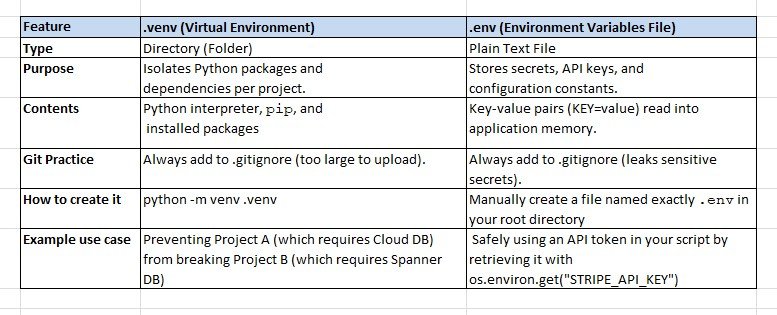
The core difference is that .venv is a folder containing a virtual, isolated Python environment, whereas .env is a plain-text file used to store confidential environment variables.
.venv Deep Dive
The .venv folder is an isolated container created using Python’s native venv module. It copies or symlinks the Python executable into its own directory structure. When you activate it, any library you install via pip gets trapped inside this specific folder instead of cluttering your global system.
How to create it: python -m venv .venv
What it looks like inside: Contains directories like bin/ (or Scripts/ on Windows), lib/pythonX.X/site-packages/, and pyvenv.cfg.
Example use case: Preventing Project A (which requires Django 3) from breaking Project B (which requires Django 5).
.env Deep Dive
The .env file is a simple configuration file read at runtime by external third-party libraries like python-dotenv. It lets you move settings and secret keys out of your source code, preventing security breaches if your code is pushed to public repositories.
How to create it: Manually create a file named exactly .env in your root directory.
What it looks like inside:
DATABASE_URL=DATABASE_URL=”postgresql://user:password@localhost/db”
STRIPE_API_KEY=”sk_test_12345″
DEBUG_MODE=True
Example use case: Safely using an API token in your script by retrieving it with os.environ.get("STRIPE_API_KEY").